Preparing Active Directory is one of the most important parts of installing Skype for Business Server 2015. On one deployment, Prepare Schema completed without problems, but Prepare Current Forest in the Deployment Wizard failed with:
Error: Object reference not set to an instance of an object.Error: Value cannot be null. Parameter name: instanceToDeleteError: An error occurred: "System.ArgumentNullException" "Value cannot be null. Parameter name: instanceToDelete"
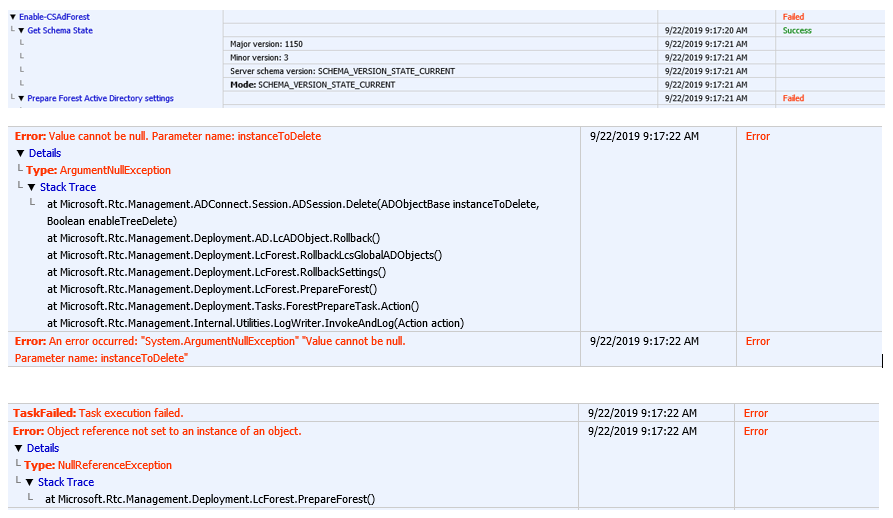
Short answer: run Enable-CsAdForest from the Skype for Business Server Management Shell, and point every parameter at the same domain controller you used for schema prep. That fixed it for me.
Applies to: Skype for Business Server 2015 / 2019 and Lync Server 2013 forest preparation.
Why it happens
The Deployment Wizard lets Windows choose which domain controllers to use. In a forest with several DCs, it can write the global settings to one DC while reading from another that hasn't received the schema changes or the newly created objects yet. The null-reference error appears when the wizard looks for an object that doesn't exist yet on the DC it's reading from. Specifying one DC for every role removes that inconsistency.
Fix: run forest prep in PowerShell with explicit DCs
Step 1: Confirm the schema is ready
Get-CsAdServerSchema
It must return SCHEMA_VERSION_STATE_CURRENT. If it doesn't, the schema changes haven't replicated yet. Wait, or check replication (Step 2).
Step 2: Check AD replication
repadmin /replsummary
repadmin /showrepl DC1.test.com
Fix any failures before continuing. Forest prep on top of broken replication will fail again, or partly succeed and leave a mess.
Step 3: Run Enable-CsAdForest with one DC for everything
Syntax:
Enable-CsAdForest -GroupDomain DomainName -GlobalSettingsDomainController DCName -GroupDomainController DCName -GlobalCatalog DCName
Example:
Enable-CsAdForest -GroupDomain Test.com -GlobalSettingsDomainController DC1.Test.com -GroupDomainController DC1.Test.com -GlobalCatalog DC1.Test.com
Use the DC that holds the schema master role if you can, since that's where the schema changes were written first:
netdom query fsmo
Step 4: Verify
Get-CsAdForest
The expected result is LC_FORESTSETTINGS_STATE_READY. Then prepare each domain and verify it:
Enable-CsAdDomain -Domain Test.com -GlobalSettingsDomainController DC1.Test.com
Get-CsAdDomain -Domain Test.com
Get-CsAdDomain should return LC_DOMAINSETTINGS_STATE_READY.
Permissions needed
| Step | Required group |
|---|---|
| Prepare Schema | Schema Admins (and Enterprise Admins) |
Prepare Current Forest (Enable-CsAdForest) |
Enterprise Admins |
Prepare Domain (Enable-CsAdDomain) |
Domain Admins in that domain |
Log off and back on after being added to a group so your token includes the new membership.
If it still fails
- Read the deployment log. Each wizard and cmdlet run writes an HTML log to your
%TEMP%folder. The last red entry usually names the exact object or DC involved. - Use
-Forceonly after checking replication. It re-runs the steps even when objects already exist, which helps after a half-finished attempt but won't fix replication problems. - Check for leftovers from an earlier install. Old RTC containers under CN=Microsoft,CN=System from a removed deployment can break prep. Look in ADSI Edit before deleting anything, and back up AD first.
Related: Install-CsMirrorDatabase failed on SfB 2015 / Lync 2013 · Lync Management Shell blank with no prompt · Active Directory tombstone lifetime