The Problem
A few days ago, I was installing Skype for Business 2015 for a client when I came across this error. The setup was quite simple:
- 3 Front End servers in Lync Pool
- 2 Back End SQL Servers
- 1 File Share & SQL Witness Server
When I reached the point to publish the topology, I encountered the error that Install-CsMirrorDatabase Failed.
Error Details
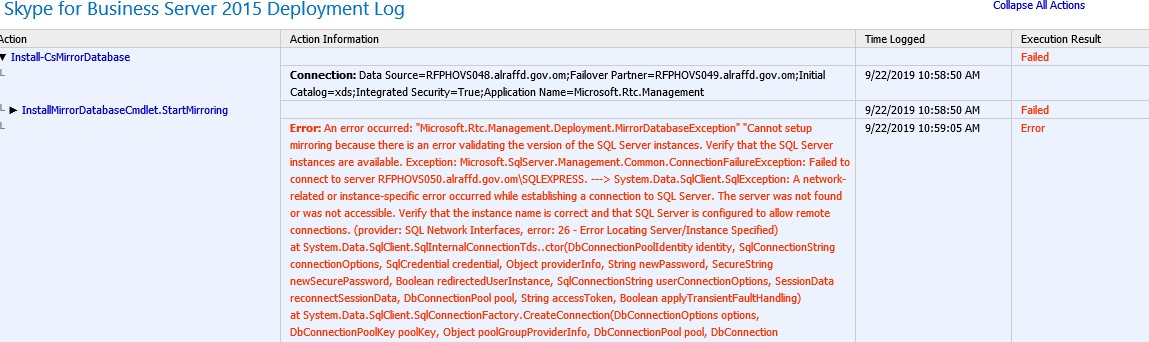
Upon checking the Skype for Business Server 2015 Deployment log, I found the full error:
Error: An error occurred: "Microsoft.Rtc.Management.Deployment.MirrorDatabaseException"
"Cannot setup mirroring because there is an error validating the version of the SQL Server instances.
Verify that the SQL Server instances are available.
Exception: Microsoft.SqlServer.Management.Common.ConnectionFailureException:
Failed to connect to server RFPHOVS050.alraffd.gov.om\SQLEXPRESS.
---> System.Data.SqlClient.SqlException:
A network-related or instance-specific error occurred while establishing a connection to SQL Server.
The server was not found or was not accessible.
Verify that the instance name is correct and that SQL Server is configured to allow remote connections.
(provider: SQL Network Interfaces, error: 26 - Error Locating Server/Instance Specified)
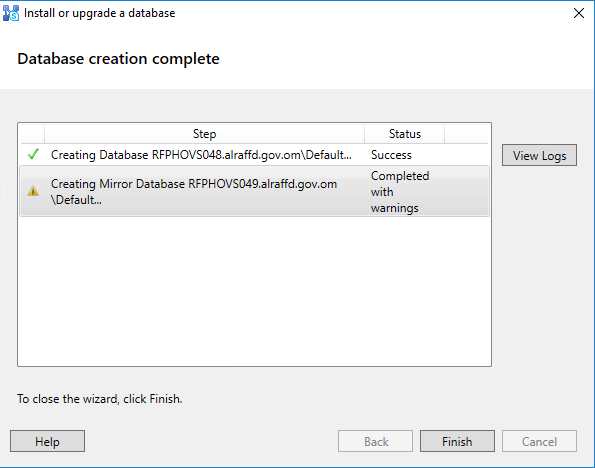
The topology builder showed: Creating Mirror Database Server.domain Completed with warnings
Solution
The error was clearly pointing to a communication issue between the SQL Server nodes and the SQL witness node. However, there was no firewall between the servers.
I started troubleshooting and found there are two settings which should be changed on the Witness node for proper communication with SQL Nodes:
Step 1: Enable SQL Server Agent Service
The SQL Server Agent (SQLEXPRESS) Service was disabled by default. It should be set to Automatic and in a running state.

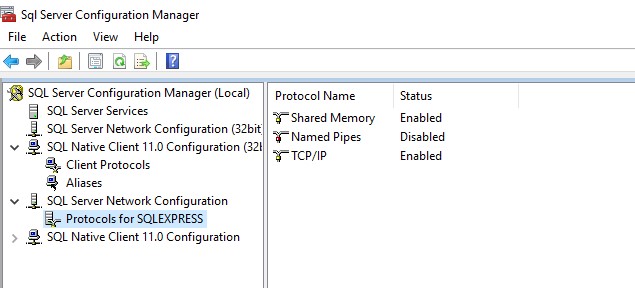
Step 2: Enable TCP/IP in SQL Server Configuration Manager
In SQL Server Configuration Manager, enable the TCP/IP protocol for Protocols for SQLEXPRESS.
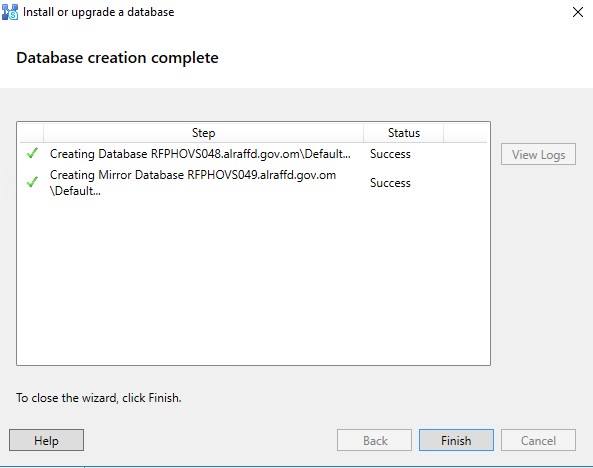
Step 3: Re-publish the Topology
Once these changes are made, you need to install/upgrade the database using the SFB/Lync Topology Builder and it will create the mirror database successfully.
Frequently Asked Questions
What causes the Install-CsMirrorDatabase failed error?
This error is typically caused by connectivity issues between the SQL Server backend nodes and the SQL witness server. Common causes include the SQL Server Agent service being disabled, TCP/IP protocol not enabled for the SQL instance, or firewall rules blocking communication.
Do I need to restart SQL Server after enabling TCP/IP?
Yes, after enabling the TCP/IP protocol in SQL Server Configuration Manager, you must restart the SQL Server (SQLEXPRESS) service for the changes to take effect.
Is a SQL Witness server required for Skype for Business high availability?
Yes, when using SQL mirroring for backend high availability in Skype for Business 2015 or Lync 2013, a SQL Witness server is required to provide automatic failover between the primary and mirror SQL databases.
Can I use SQL Always On instead of SQL Mirroring for SFB 2015?
Skype for Business 2015 supports both SQL Mirroring and SQL Always On Availability Groups for backend high availability. SQL Always On is the recommended approach for newer deployments as SQL Mirroring has been deprecated in newer SQL Server versions.