What is SSL & TLS and Why We Need to Disable Old Versions?
SSL (Secure Socket Layer) is a technology to keep an internet connection secure or protected when there is a data transfer between two systems and prevents criminals from stealing that data or information. For example, credit card transactions on a shopping website. SSL uses an encryption algorithm to scramble data to keep it safe from hackers.
TLS (Transport Layer Security) is an updated, reliable and more secure version of SSL. We need to disable the old versions of SSL and TLS as they can be a security threat to your network.
How to Disable SSL 2.0, SSL 3.0, TLS 1.0, TLS 1.1 & Enable TLS 1.2
Objective: Disabling SSL 2.0, SSL 3.0, TLS 1.0, TLS 1.1 & Enable TLS 1.2 on Windows PCs
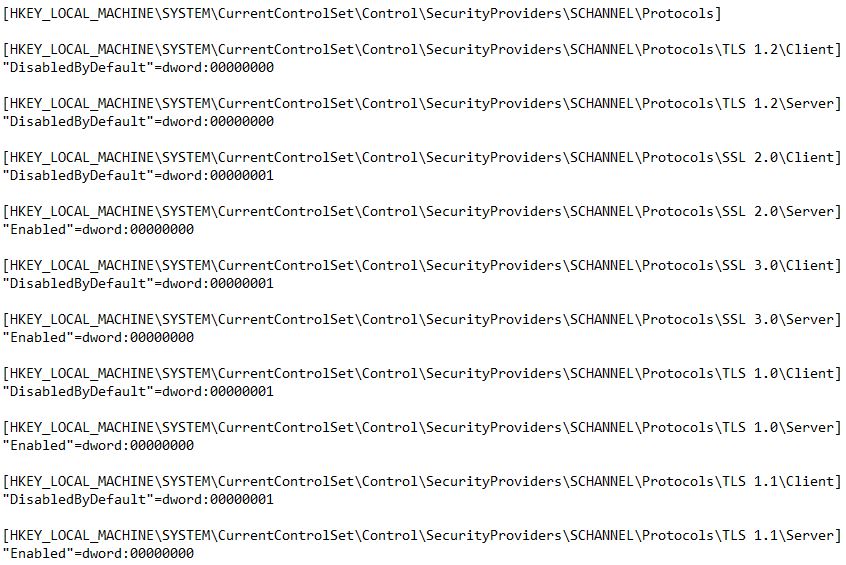
Solution: This procedure involves editing in the registry so it's better to take a registry backup, or if your server is virtual, take a snapshot for restoring later. In addition to this, make sure that your application running on the server supports TLS 1.2, which will be the only active TLS protocol.
Step 1: Open the Registry Editor
Open the registry console with administrative access.
Step 2: Navigate to the Protocols Path
Browse to the following path and create the Keys, sub keys, and then DWORD Values:
HKEY_LOCAL_MACHINE\SYSTEM\CurrentControlSet\Control\SecurityProviders\SCHANNEL\Protocols
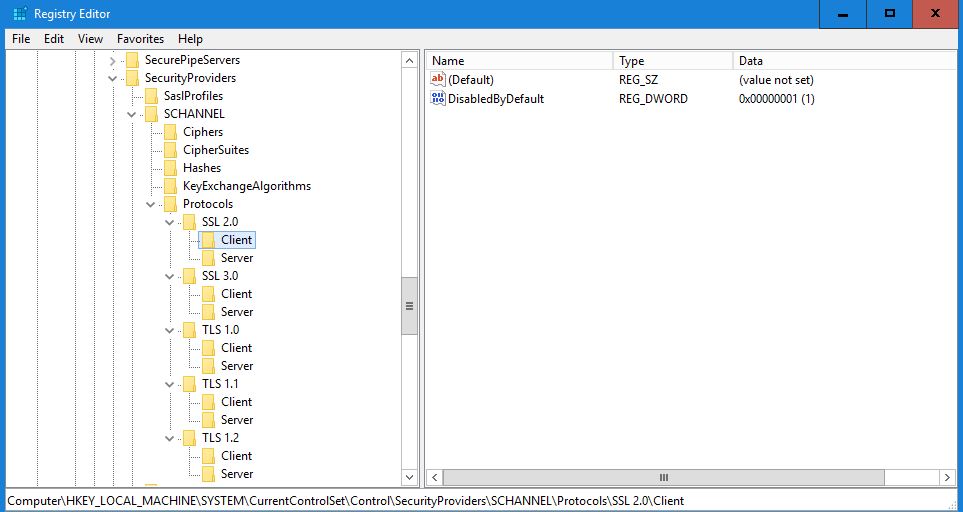
Enable TLS 1.2
[HKEY_LOCAL_MACHINE\SYSTEM\CurrentControlSet\Control\SecurityProviders\SCHANNEL\Protocols\TLS 1.2\Client]
"DisabledByDefault"=dword:00000000

[HKEY_LOCAL_MACHINE\SYSTEM\CurrentControlSet\Control\SecurityProviders\SCHANNEL\Protocols\TLS 1.2\Server]
"DisabledByDefault"=dword:00000000
Disable SSL 2.0
[HKEY_LOCAL_MACHINE\SYSTEM\CurrentControlSet\Control\SecurityProviders\SCHANNEL\Protocols\SSL 2.0\Client]
"DisabledByDefault"=dword:00000001

[HKEY_LOCAL_MACHINE\SYSTEM\CurrentControlSet\Control\SecurityProviders\SCHANNEL\Protocols\SSL 2.0\Server]
"Enabled"=dword:00000000
Disable SSL 3.0
[HKEY_LOCAL_MACHINE\SYSTEM\CurrentControlSet\Control\SecurityProviders\SCHANNEL\Protocols\SSL 3.0\Client]
"DisabledByDefault"=dword:00000001

[HKEY_LOCAL_MACHINE\SYSTEM\CurrentControlSet\Control\SecurityProviders\SCHANNEL\Protocols\SSL 3.0\Server]
"Enabled"=dword:00000000
Disable TLS 1.0
[HKEY_LOCAL_MACHINE\SYSTEM\CurrentControlSet\Control\SecurityProviders\SCHANNEL\Protocols\TLS 1.0\Client]
"DisabledByDefault"=dword:00000001

[HKEY_LOCAL_MACHINE\SYSTEM\CurrentControlSet\Control\SecurityProviders\SCHANNEL\Protocols\TLS 1.0\Server]
"Enabled"=dword:00000000
Disable TLS 1.1
[HKEY_LOCAL_MACHINE\SYSTEM\CurrentControlSet\Control\SecurityProviders\SCHANNEL\Protocols\TLS 1.1\Client]
"DisabledByDefault"=dword:00000001

[HKEY_LOCAL_MACHINE\SYSTEM\CurrentControlSet\Control\SecurityProviders\SCHANNEL\Protocols\TLS 1.1\Server]
"Enabled"=dword:00000000
Step 3: Download the Registry File
To save time, download the following registry file and run it to make all the above changes:
Disable TLS SSL (Click to download file)