
Finding VM with Fixed or Round Robin MultiPath Policy
Managing storage paths for virtual machines (VMs) in complex virtual environments can become challenging. Path selection policies like RoundRobin or Fixed are crucial for optimizing resource utilization and ensuring high availability.
However, altering these policies across multiple VMs manually can be time-consuming. Here's a step-by-step guide on using VMware PowerCLI to identify VMs using either RoundRobin or Fixed path selection and potentially modify them.
Objective
In some cases, we need to change the Path Selection from RoundRobin to Fixed or vice versa. It is quite difficult to check each VM and change their RDM path policy.
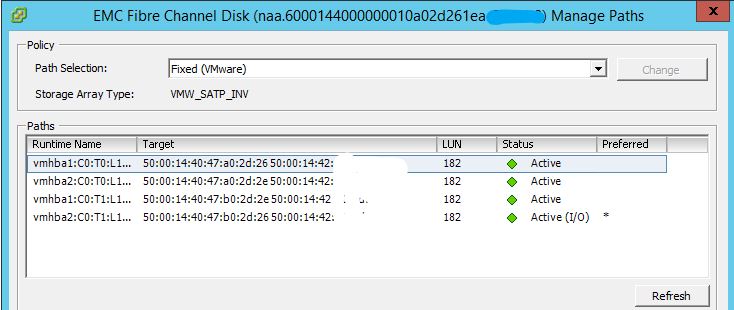
Solution
PowerCLI, a command-line interface for VMware, provides a simple yet powerful way to script tasks. The following script segments help identify VMs with specific path selection policies.
1. Find All VMs with Fixed Selection Path
Get-VM | Get-HardDisk | Where-Object {$_.DiskType -like "Raw*"} | Where-Object {$_.MultipathPolicy -notlike "RoundRobin"} | Select @{N="VMName";E={$_.Parent}},Name
2. Find All VMs with RoundRobin Selection Path
Get-VM | Get-HardDisk | Where-Object {$_.DiskType -like "Raw*"} | Where-Object {$_.MultipathPolicy -notlike "Fixed"} | Select @{N="VMName";E={$_.Parent}},Name
To export the results to a CSV file, append the following to either command:
| Export-Csv C:\RDM-list.csv -NoTypeInformation
Output
| VMName | Name |
| VM1 | Hard disk 13 |
| VM2 | Hard disk 4 |
| VM3 | Hard disk 7 |
| VM4 | Hard disk 1 |
Conclusion
Automating the identification of VMs using specific path selection policies through PowerCLI simplifies the management of storage configurations in VMware environments. This approach enhances efficiency, allowing administrators to identify VMs requiring policy modifications without manual intervention swiftly.
Frequently Asked Questions
What is the difference between Fixed and RoundRobin multipath policies in VMware?
Fixed multipath policy uses a single preferred path to the storage device, switching to an alternate path only if the preferred one fails. RoundRobin distributes I/O requests across all available paths in a circular pattern, which can improve throughput and balance the load across storage paths.
How do I change the multipath policy for a VM in vSphere?
You can change the multipath policy using the vSphere Client by navigating to the host's storage adapter settings, selecting the datastore or RDM, and modifying the path selection policy. Alternatively, you can use PowerCLI with the Set-ScsiLun cmdlet to change it via script.
Why should I avoid modifying the default multipath policy without testing?
Changing multipath policies can affect storage performance and availability. RoundRobin may not be optimal for all storage arrays, and some vendors recommend Fixed for specific configurations. Always consult your storage vendor's best practices before making changes.
Can I use PowerCLI to bulk-change multipath policies across all VMs?
Yes, PowerCLI supports bulk operations. You can pipe the results of the discovery commands into Set-ScsiLun to change the multipath policy for all matching VMs at once, but it is recommended to test on a small subset first.