An error occurred while taking a snapshot: Failed to quiesce the virtual machine. ESXi 6.5 - Windows 2012 R2
The Issue
The virtual machine has a physical RDM (Raw Device Map) attached. When taking a backup or manual snapshot, you will see the following error:
"An error occurred while quiescing the virtual machine. See the virtual machine's event log for details."
"An error occurred while taking a snapshot: Failed to quiesce the virtual machine."
"An error occurred while saving the snapshot: Failed to quiesce the virtual machine."

Event Viewer Error
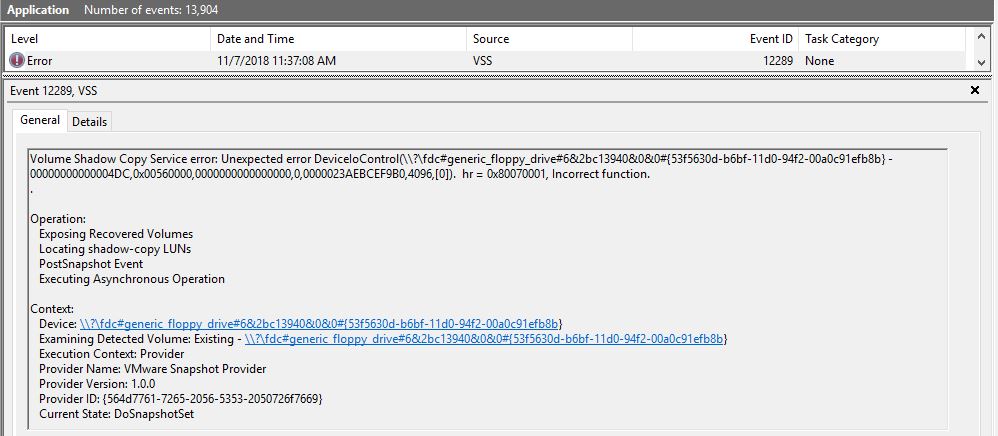
An error also appears in the Event Viewer application logs of the system:
Volume Shadow Copy Service error: Unexpected error DeviceIoControl(
\\?\fdc#generic_floppy_drive#6&2bc13940&0&0#{53f5630d-b6bf-11d0-94f2-00a0c91efb8b}
- 00000000000004DC,0x00560000,0000000000000000,0,0000023AEBCEF9B0,4096,[0]).
hr = 0x80070001, Incorrect function.

Operation:
   Exposing Recovered Volumes
   Locating shadow-copy LUNs
   PostSnapshot Event
   Executing Asynchronous Operation

Context:
   Device: \\?\fdc#generic_floppy_drive#6&2bc13940&0&0#{53f5630d-b6bf-11d0-94f2-00a0c91efb8b}
   Examining Detected Volume: Existing - \\?\fdc#generic_floppy_drive#6&2bc13940&0&0#{53f5630d-b6bf-11d0-94f2-00a0c91efb8b}
   Execution Context: Provider
   Provider Name: VMware Snapshot Provider
   Provider Version: 1.0.0
   Provider ID: {564d7761-7265-2056-5353-2050726f7669}
   Current State: DoSnapshotSet
Solution
There can be multiple reasons for this error to appear. Below are two methods to resolve it.
Method 1: Remove the Floppy Drive
- Right-click the virtual machine and select Settings.
- You will find there is a floppy drive listed, which is commonly not required. You can also confirm this by logging on to the operating system and checking the drives in My Computer.
- Attempt to remove the floppy drive. You may fail, so you have to shut down the VM and remove it.
- In some cases, the floppy drive still appears in My Computer even after removing it from settings. Follow these additional steps to completely get rid of it:
- Power off the virtual machine.
- Right-click the virtual machine and click Edit Settings.
- Click the Options tab.
- Click Boot Options under Advanced.
- Select The next time the virtual machine boots, force entry into the BIOS setup screen option.
- Power on the virtual machine.
- Using arrow keys, disable Legacy Diskette A:.
- Press F10 to save the changes and exit. The machine reboots and completes the configuration.
Method 2: Modify VMware Tools VSS Support
- Open Programs and Features, right-click VMware Tools, and select Change.
- Click Next, then select Modify.
- Select Volume Shadow Copy services support, click Entire feature will be unavailable.
- Click Next, then click Change, and finally click Finish.

Frequently Asked Questions
What does "quiesce" mean in VMware snapshots?
Quiescing a virtual machine means pausing or freezing the file system I/O operations using VMware Tools and the guest OS Volume Shadow Copy Service (VSS). This ensures a consistent snapshot of the disk state without data corruption.
Does removing the floppy drive affect the virtual machine?
No. Modern operating systems do not require a floppy drive. Removing it from the VM settings eliminates a legacy device that can interfere with the VSS quiesce process during snapshots.
Will disabling VSS in VMware Tools affect my backups?
Disabling VSS means snapshots will be crash-consistent rather than application-consistent. This is acceptable for most workloads, but database servers (such as SQL Server or Exchange) should use application-consistent snapshots for reliable recovery.
Does this error occur on ESXi versions other than 6.5?
Yes. The "Failed to quiesce" error can occur on any ESXi version when a floppy drive or incompatible device interferes with VSS operations. The same solutions apply to ESXi 6.7, 7.0, and 8.0.
Can I take a snapshot without quiescing?
Yes. When creating a manual snapshot in the vSphere Client, uncheck the "Quiesce guest file system" option. This creates a crash-consistent snapshot that does not invoke VSS, avoiding the error entirely.