An error occurred while using SSL configuration for endpoint 0.0.0.0:444
Encountering errors in system logs can be a daunting experience, especially when dealing with critical applications like Exchange Server. One common issue that users might face is Event ID 15021, which indicates an error in SSL configuration for a specific endpoint.
In this blog post, we'll explore the root cause of this issue and provide a step-by-step solution to resolve it.
Issue
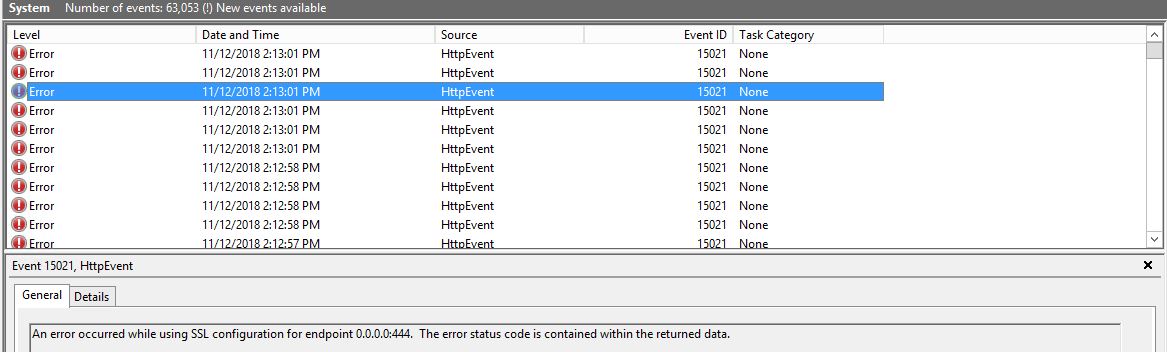
If you're receiving continuous errors in the system logs with Event ID 15021, it's likely that an Exchange Server application is installed on the server. This error, logged under the Microsoft-Windows-HttpEvent source, indicates a problem with SSL configuration for the endpoint 0.0.0.0:444.
Log Name: System
Source: Microsoft-Windows-HttpEvent
Date: 11/12/2018 2:12:58 PM
Event ID: 15021
Task Category: None
Level: Error
Keywords: Classic
User: N/A
Computer: EX01.domain.com
Description:
An error occurred while using SSL configuration for endpoint 0.0.0.0:444.
The error status code is contained within the returned data.
Solution
Follow these steps to resolve the SSL configuration error:
Step 1: Open IIS Manager
Open the IIS application and navigate to Server Name > Sites > Exchange Back End.
Step 2: Open Site Bindings
Click on Exchange Back End, then click on Bindings in the right actions pane.
Step 3: Edit the HTTPS Binding
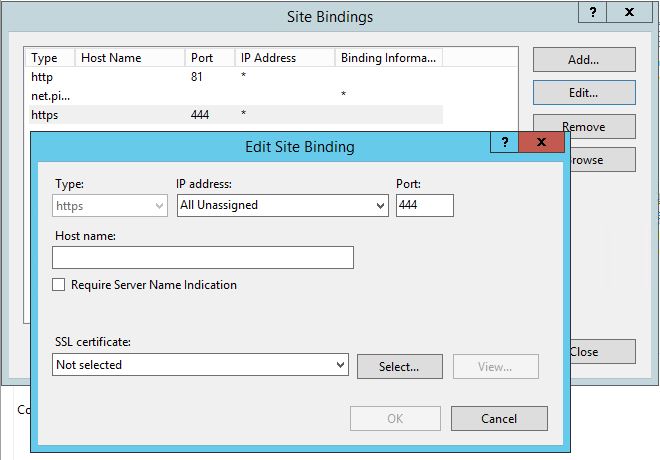
Select the https type with port 444 and click Edit.
Step 4: Assign the SSL Certificate
You will notice there is no certificate assigned. Select the appropriate SSL certificate from the dropdown and click OK.
Step 5: Verify the Fix
Go back to the system logs and you will see no more errors for Event ID 15021. You should now see the following confirmation message:
SSL Certificate Settings created by an admin process for endpoint: 0.0.0.0:444
Summary
Resolving SSL configuration errors in Exchange Server, as indicated by Event ID 15021, is a straightforward process. By ensuring that the correct certificate is selected in the IIS application, you can eliminate these errors and maintain the smooth operation of your Exchange Server.
Regularly monitoring system logs and addressing issues promptly is essential for the overall health and performance of your server infrastructure.
Frequently Asked Questions
What causes Event ID 15021 on an Exchange Server?
Event ID 15021 occurs when the SSL certificate binding for a specific endpoint (such as 0.0.0.0:444) is missing or invalid in IIS. This commonly happens after certificate renewals or Exchange updates where the certificate assignment is lost.
Which certificate should I select for the Exchange Back End binding on port 444?
You should select the Exchange Server's self-signed certificate or the certificate that was originally assigned to the Exchange Back End site. This is typically the Microsoft Exchange Server Auth Certificate or your organization's SSL certificate.
Will this error affect Exchange mail flow?
While the error itself may not immediately stop mail flow, an improperly configured SSL binding on port 444 can cause issues with internal Exchange communication, including problems with the Exchange Back End services and EWS functionality.
How do I prevent this error from recurring after certificate renewals?
After renewing or replacing SSL certificates on your Exchange Server, always verify the IIS bindings for both the Default Web Site and Exchange Back End site to ensure the correct certificates are assigned to all HTTPS bindings.