
What Is the Active Directory Tombstone Lifetime?
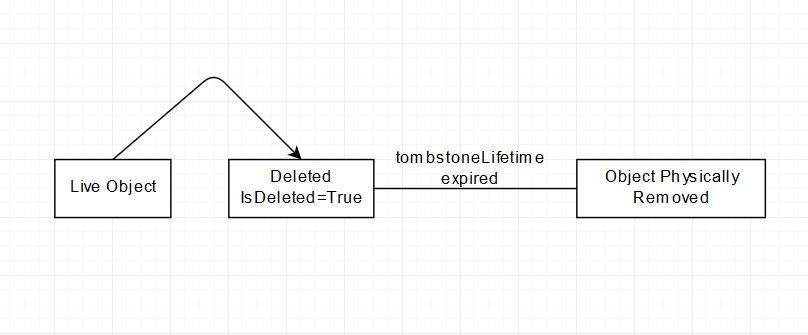
Once you delete an object from Active Directory, it does not delete permanently. Instead, the object turns into a tombstone. Active Directory sets the isDeleted attribute to True for the object.
However, AD does not keep this object forever and removes it permanently when it reaches the life of a tombstone -- a retention period for tombstone objects. The following diagram explains this process, making it easy to understand for beginners.
We can view deleted objects in Active Directory using the following PowerShell command:
Get-ADObject -ldapFilter:"(msDS-LastKnownRDN=*)" -IncludeDeletedObjects
Default Tombstone Lifetime (TSL) Value in Different Operating Systems
| Operating System | Tombstone Lifetime |
|---|---|
| Windows 2000 | 60 days |
| Windows 2003 RTM | 60 days |
| Windows 2003 SP1 | 180 days |
| Windows 2003 R2 | 60 days |
| Windows 2003 SP2 | 180 days |
| Windows 2003 R2 SP2 | 180 days |
| Windows Server 2008 | 180 days |
| Windows Server 2008 R2 | 180 days |
| Windows Server 2012 & R2 | 180 days |
| Windows 2016 | 180 days |
| Windows 2019 | 180 days |
Why Tombstone Lifetime Matters
Tombstone lifetime is also important when taking backup and restoring Active Directory objects:
- You cannot restore deleted objects from a backup older than the tombstone lifetime.
- You cannot keep a domain controller in a disconnected state longer than the tombstone lifetime. Otherwise, inbound and outbound replication will be disabled automatically to avoid replicating lingering objects.
How to Check Tombstone Lifetime (TSL) Value
We can determine the Active Directory tombstone value using PowerShell and the ADSI Edit tool.
Method 1: Using PowerShell
Open Active Directory Module for Windows PowerShell or import the Active Directory Module, then run:
(Get-ADObject -Server xxxx "cn=Directory Service,cn=Windows NT,cn=Services,cn=Configuration,dc=xxxx,dc=xxxx" -Properties "tombstonelifetime").tombstonelifetime
Replace xxxx with your domain controller name and domain components.

Method 2: Using ADSI Edit Tool
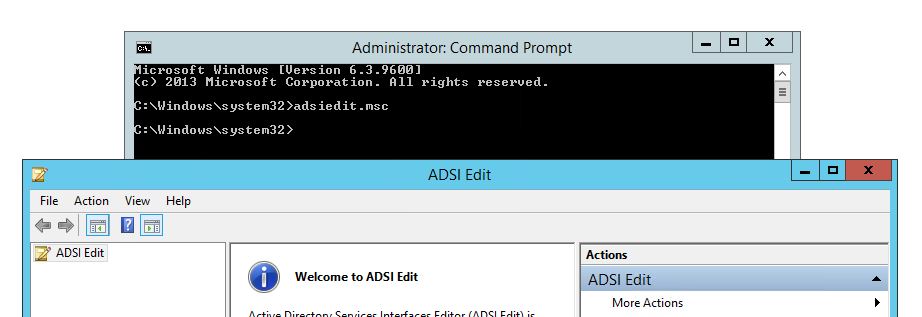
Open command prompt (admin) and type:
adsiedit.msc
Step 1: Connect to Configuration Naming Context
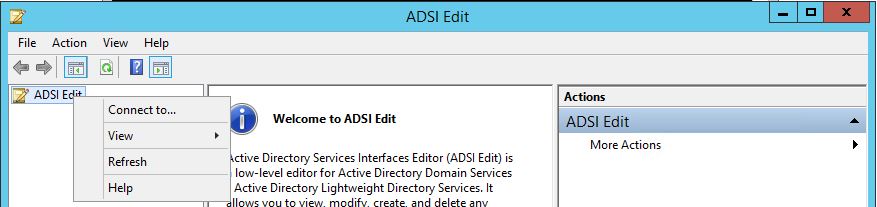
Right-click ADSI Edit and click Connect.
Step 2: Select Configuration Naming Context
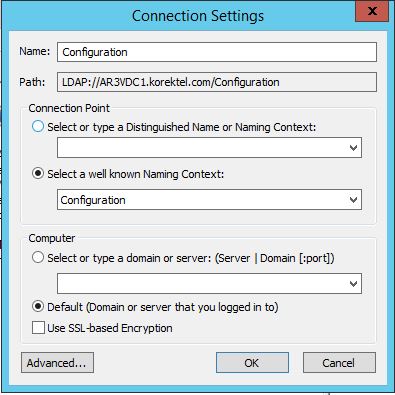
In the Connection Point section, select the Select a well known Naming Context radio button and select Configuration from the dropdown list.
Step 3: Navigate to Directory Service
Expand Configuration > CN=Configuration,DC=<forest_root_domain> > CN=Services > CN=Windows NT.
Step 4: Open Directory Service Properties
Right-click CN=Directory Service and select Properties.
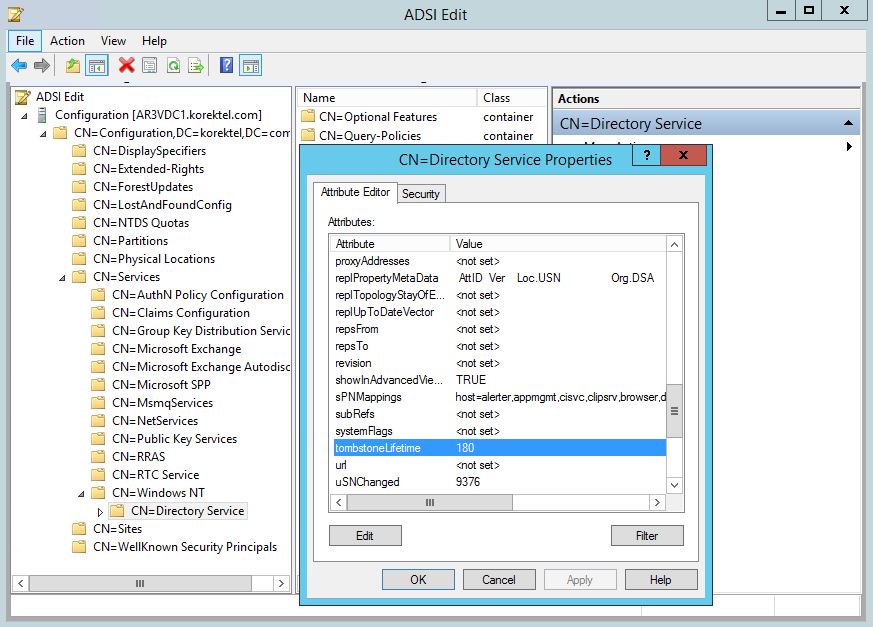
Step 5: Check the Tombstone Lifetime Attribute
In the Attribute Editor tab of the properties window, locate the tombstoneLifetime attribute. The value of this attribute represents the forest's current tombstone lifetime in days.
If the attribute's value shows <not set>, the tombstone lifetime of the forest defaults to 60 days.
Modify Tombstone Lifetime Value with PowerShell
Run the following PowerShell command to change the tombstone lifetime:
Set-ADObject -Server xxxx "cn=Directory Service,cn=Windows NT,cn=Services,cn=Configuration,dc=xxxx,dc=xxxx" -Replace @{'tombstonelifetime'="240"}
Do not forget to change the highlighted values according to your environment:
- -Server: Your domain controller name
- dc: dc=contoso,dc=com (in case your domain name is contoso.com)
Change Tombstone Lifetime Value with ADSI Edit

Follow Steps 1 to 5 from the ADSI Edit method above, then:
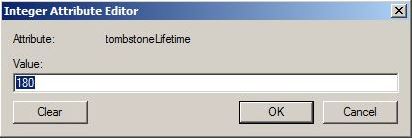
- To modify the tombstone lifetime, click Edit.
- Type the desired tombstone lifetime and click OK. Click OK again to close the properties window. The change takes effect immediately.
Tombstone lifetime value plays an important role in Active Directory backup, restore, and replication, so it should be set carefully.
Frequently Asked Questions
What is the default tombstone lifetime in Active Directory?
For Windows Server 2003 SP1 and later, the default tombstone lifetime is 180 days. For Windows 2000 and Windows Server 2003 RTM/R2 (without SP1), the default is 60 days.
Can I restore Active Directory objects after the tombstone lifetime expires?
No, once the tombstone lifetime has expired, the deleted object is permanently removed from Active Directory and cannot be restored from a backup taken before the tombstone period ended.
Does changing the tombstone lifetime affect existing tombstone objects?
Yes, if you increase the tombstone lifetime, existing tombstone objects that have not yet been permanently deleted will benefit from the extended retention period. The change takes effect immediately.
What happens if a domain controller is disconnected longer than the tombstone lifetime?
If a domain controller remains disconnected longer than the tombstone lifetime, Active Directory automatically disables inbound and outbound replication to prevent lingering objects from being replicated across the environment.
Should I increase the tombstone lifetime value in my environment?
Increasing the tombstone lifetime gives you a longer window to restore deleted objects and keeps disconnected DCs eligible for replication longer. However, it also means deleted objects consume directory space for a longer period. A value of 180 days is appropriate for most environments.