Disable Network Level Authentication (NLA) On Remote Computer
When attempting to connect to a remote computer through Remote Desktop Services, encountering an obstacle in the form of a message requesting Network Level Authentication (NLA) might arise. This message often surfaces due to an inability to contact the Windows domain controller necessary for NLA. In such instances, disabling NLA becomes necessary to establish the remote connection smoothly.
Issue
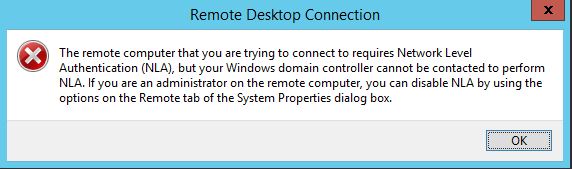
You receive the following message when you try to access a remote computer using Remote Desktop Services.
"The remote computer that you are trying to connect to requires Network Level Authentication (NLA), but your Windows domain controller cannot be contacted to perform NLA. If you are an administrator on the remote computer, you can disable NLA by using the options on the Remote tab of the System Properties dialog box."
Solutions
You can fix this issue by following methods.
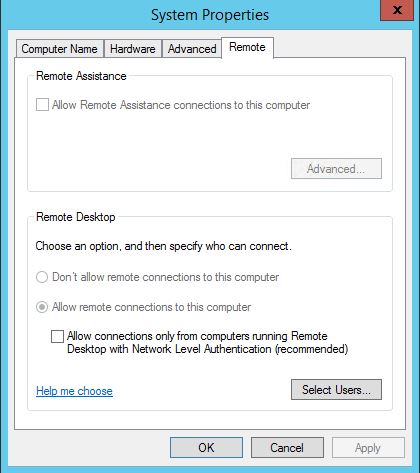
Method 1: Disable NLA via System Properties
If you have access to the computer, disable the Network Level Authentication settings from Advanced System Settings --> Remote.
Method 2: Disable NLA via Registry Editor
If you don't have access to the computer, you can make this change by editing the registry settings of the remote computer:
- Open Registry Editor with administrative access.
- Connect Network Registry.
- Enter your remote computer Name.
- Browse to the Key
HKEY_LOCAL_MACHINE\SYSTEM\CurrentControlSet\Control\Terminal Server\WinStations\RDP-Tcp - Find Value Name "UserAuthentication" and change Value Data to 0.

Additional Considerations
For users encountering challenges in establishing remote connections due to Network Level Authentication (NLA) requirements, it's important to ensure appropriate permissions and administrative access. Additionally, altering registry settings requires caution and familiarity with the Windows registry.
Disabling Network Level Authentication (NLA) serves as a viable solution when faced with hindrances while connecting to a remote computer through Remote Desktop Services. Whether through direct computer access or via registry modifications, these methods offer pathways to circumvent NLA requirements and facilitate smoother remote connections.