An error occurred while taking a snapshot: Failed to quiesce the virtual machine (VCSA 6.5 HA)
Virtualization has revolutionized data management, enabling seamless operations and enhanced flexibility. VMware's vCenter Server Appliance (VCSA) 6.5 with vCenter High Availability (VCHA) is a robust solution, but sometimes snapshot errors can disrupt backup processes.
Understanding these errors and finding suitable solutions is crucial for maintaining a stable virtual environment.
Identifying the Issue
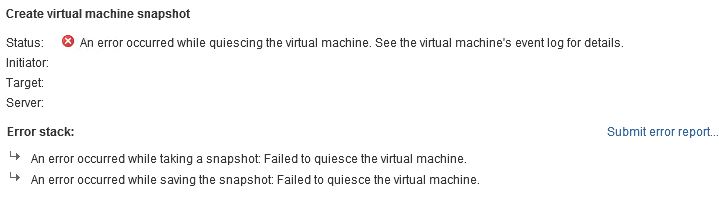
When attempting to back up VCSA 6.5 with VCHA, especially on the peer node and witness VM, users may encounter the following snapshot error message:
"An error occurred while quiescing the virtual machine. See the virtual machine's event log for details. An error occurred while taking a snapshot: Failed to quiesce the virtual machine. An error occurred while saving the snapshot."
Exploring the Problem
This error often arises due to the nature of VCSA being in HA mode. VMware Knowledge Base article #2148003 explicitly states that snapshotting VCHA nodes is not supported for backups. The official response from VMware clarifies this stance:
Are snapshots, cloning, and Fault Tolerance supported on VCHA nodes?
No, it's currently not supported to use these operations on any of the VCHA nodes.
Note: File-Based backups of the VCHA Active node are supported. Do not backup or restore the Passive and Witness nodes. Image-Based backups of the Active VCHA node are not supported. Image-Based backups use snapshots during the process which could cause a failover in environments with high latency, and may result in an inconsistent state on the restored vCenter.
Solutions and Workarounds
While snapshots for backups are not supported in VCHA mode, VMware recommends utilizing Image Level backups for VCHA nodes. This approach ensures data integrity without disrupting the VCHA's operation. Consider implementing these steps:
1. Use File-Based Backups
Employ file-based backup methods for the VCHA Active node. This is the officially supported backup approach and ensures data protection and integrity.
2. Regular Monitoring
Continuously monitor VMware documentation and updates for any changes or additional solutions to snapshot errors in VCSA 6.5 with VCHA.
3. Develop Comprehensive Backup Strategies
Build backup strategies that align with VMware's guidelines to prevent issues during backup processes:
- Use file-based backups for the Active node only
- Exclude Passive and Witness nodes from snapshot-based backup jobs
- Document your VCHA backup procedures for your team
Conclusion
Snapshot errors during backups in VMware VCSA 6.5 with VCHA can be perplexing, especially when encountering the "Failed to quiesce the virtual machine" message. However, understanding the limitations and following VMware's recommendations for file-based backups can ensure data security and prevent disruptions in the high availability setup.
Monitoring, adherence to best practices, and exploring officially supported backup methods will help maintain a robust virtual environment.
Frequently Asked Questions
Why does the "Failed to quiesce" error occur on VCSA HA nodes?
The error occurs because VMware does not support snapshots on VCHA Passive and Witness nodes. The quiesce operation fails because the HA configuration prevents the virtual machine from being safely frozen for a snapshot.
Can I take snapshots of the VCSA Active node in a VCHA cluster?
No, image-based backups (which use snapshots) of the Active VCHA node are not supported either. Snapshots during the process could cause a failover in high-latency environments and may result in an inconsistent state on the restored vCenter.
What is the recommended backup method for VCSA 6.5 with High Availability?
VMware recommends using file-based backups of the VCHA Active node only. Do not attempt to backup or restore the Passive and Witness nodes. You can configure file-based backups through the VCSA management interface (VAMI) at port 5480.
How do I exclude VCHA nodes from my backup job?
In your backup software, identify the Passive and Witness VMs by their names and exclude them from any snapshot-based or image-level backup jobs. Only include the Active node and use file-based backup methods for it.
Does this issue affect VCSA versions newer than 6.5?
The limitation on snapshotting VCHA nodes applies to all VCSA versions that support vCenter High Availability. Always check the VMware Knowledge Base for your specific version for the latest guidance on supported backup methods.